
AI Agents
AI-powered sales agents that handle email outreach
AI Agents are automated sales assistants that handle email outreach and responses for your campaigns.
What Are AI Agents?
Each Sales Manager receives 10 AI Agents when their account is created. These agents:
- Generate personalized outreach emails
- Auto-reply to lead responses
- Follow campaign instructions
- Use knowledge base context for accuracy
Your Agents
View and manage your AI agents from the My Agents page at /my-agents.
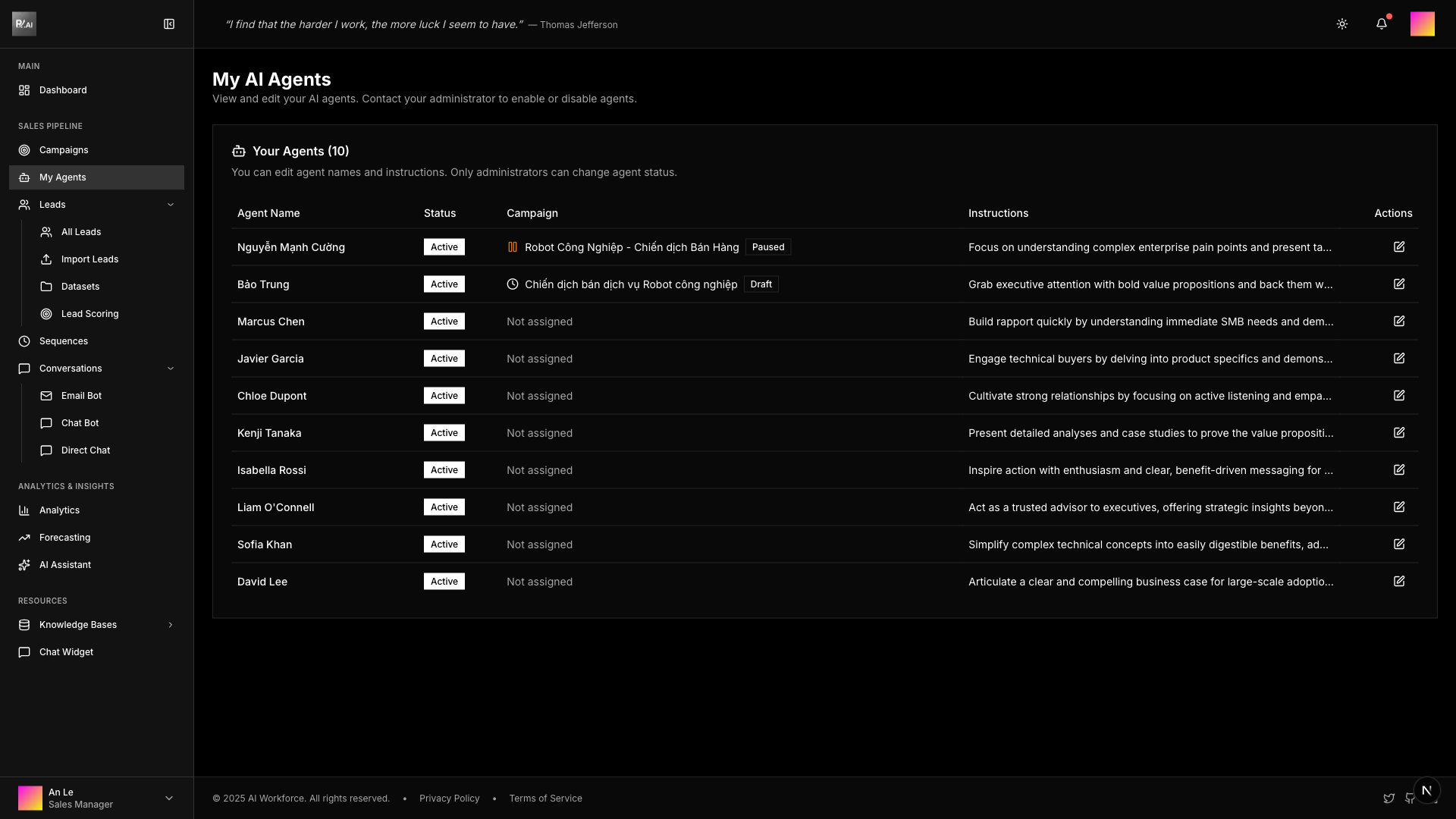
The agents table shows:
- Agent Name - Display name for each agent
- Status - Active, inactive, or suspended
- Campaign - Current campaign assignment (with status indicator)
- Instructions - Agent's behavioral guidelines (truncated)
- Actions - Edit button to modify agent settings
Agent Properties
| Property | Editable By | Description |
|---|---|---|
| Name | Sales Manager | Agent display name (customizable) |
| Instructions | Sales Manager | AI guidelines for email writing style and approach |
| Status | Admin/Director | active, inactive, or suspended |
| Daily Quota | Admin/Director | Maximum emails per day (default: 100) |
Note: Agents are automatically created when a user becomes a Sales Manager. They cannot be manually created or deleted.
Editing Agents
As a Sales Manager, you can customize your agent's name and instructions to match different campaign strategies.
How to Edit an Agent
- Go to My Agents page (
/my-agents) - Find the agent you want to edit in the table
- Click the Edit button (pencil icon) in the Actions column
- Modify the agent details in the dialog
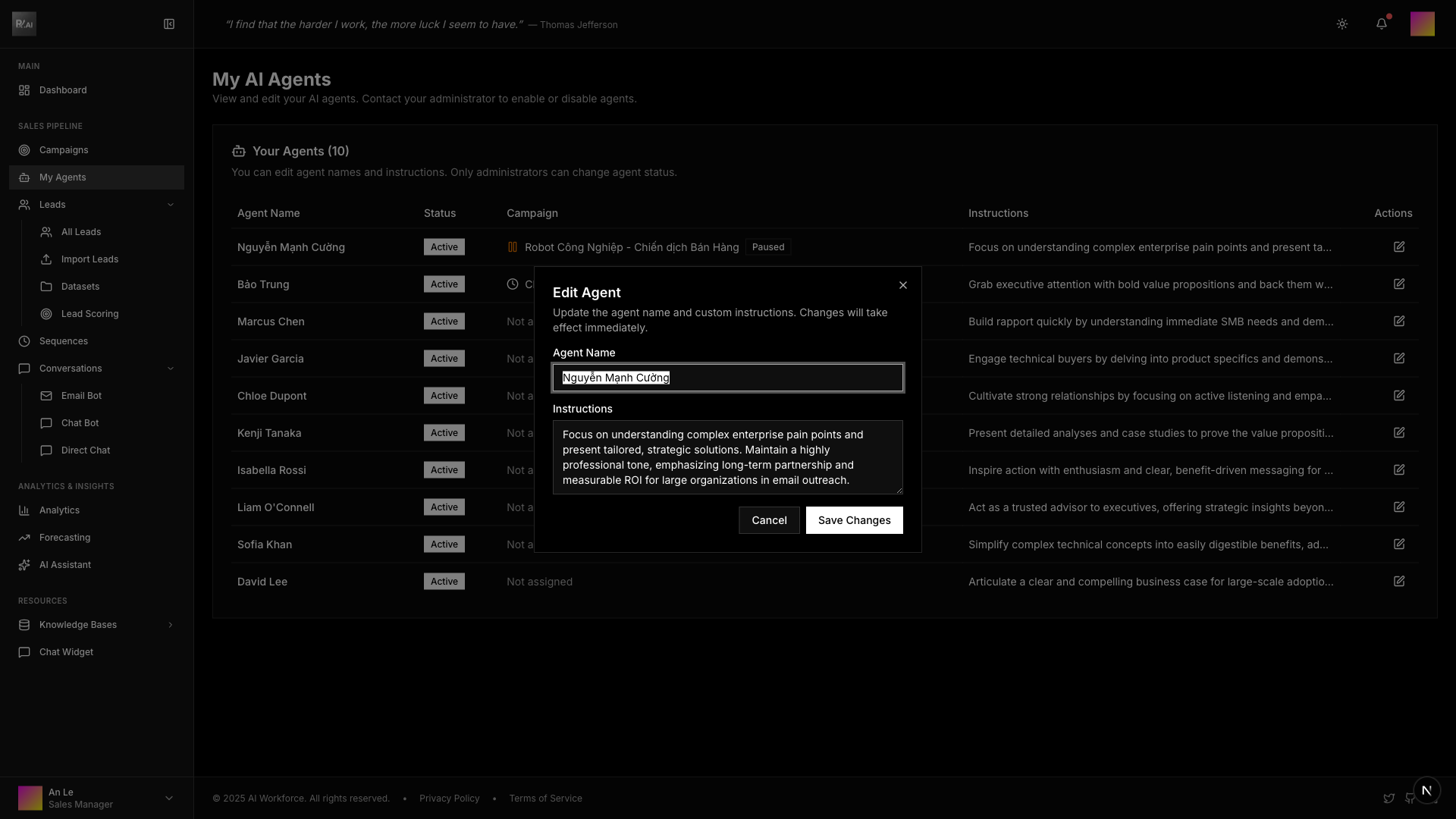
Agent Name
Give your agent a descriptive name that reflects its purpose or campaign focus.
Examples:
- Nguyễn Mạnh Cường
- Bảo Trung
- Marcus Chen
- Javier García
Agent Instructions
Write clear instructions that guide the agent's communication style and approach. This is crucial for personalized, on-brand outreach.
Good instructions include:
- Tone and style - Professional, friendly, technical, etc.
- Key messaging - Value propositions to emphasize
- Approach - How to engage different customer types
- Constraints - What to avoid or limitations
Example instructions:
- "Focus on understanding complex enterprise pain points and present tailored solutions"
- "Grab executive attention with bold value propositions and back them with data"
- "Build rapport quickly by understanding immediate SMB needs and demonstrating quick wins"
- "Engage technical buyers by delving into product specifics and demonstrating deep expertise"
Campaign Assignment
| Assignment Rule | Description |
|---|---|
| One at a time | Each agent can only work on one campaign at a time |
| Automatic | Agents are assigned when you create or edit a campaign |
| Status required | Agent must have "Active" status to be assigned |
When an agent is assigned to a campaign:
- The campaign name and status appear in the Campaign column
- Status indicators show: Draft, Ready, Running, Paused, or Finished
- The agent cannot be assigned to another campaign until unassigned
Agent Status
| Status | Description | Can Be Assigned |
|---|---|---|
| Active | Agent is operational and ready | ✓ Yes |
| Inactive | Agent is disabled | ✗ No |
| Suspended | Agent is temporarily restricted | ✗ No |
Note: Only administrators and directors can change agent status. Contact your administrator if you need to enable or disable agents.
Key Constraints
- ✓ Each agent can be assigned to one campaign at a time
- ✓ Agents use the Sales Manager's email account (no individual accounts)
- ✓ Daily email quota limits outreach volume per agent
- ✓ Status must be "Active" to participate in campaigns
- ✓ Sales Managers can only edit name and instructions
Best Practices
1. Write Specific Instructions
Don't use generic instructions. Tailor each agent's approach to specific customer segments or campaign goals.
❌ Avoid: "Send good emails"
✓ Good: "Focus on understanding complex enterprise pain points and present tailored solutions with executive-level language"
2. Use Different Agents for Different Campaigns
Assign specific agents to specific campaign types:
- Enterprise agents with formal, technical language
- SMB agents with casual, benefit-focused messaging
- Technical agents with detailed product knowledge
- Executive agents with high-level value propositions
3. Monitor Campaign Performance
Track which agents perform best in different scenarios and refine their instructions based on:
- Open rates
- Reply rates
- Conversion metrics
- Lead feedback
4. Keep Instructions Updated
As your product evolves or you learn what resonates with leads, update agent instructions to reflect:
- New features or benefits
- Updated messaging
- Competitive differentiators
- Market changes